


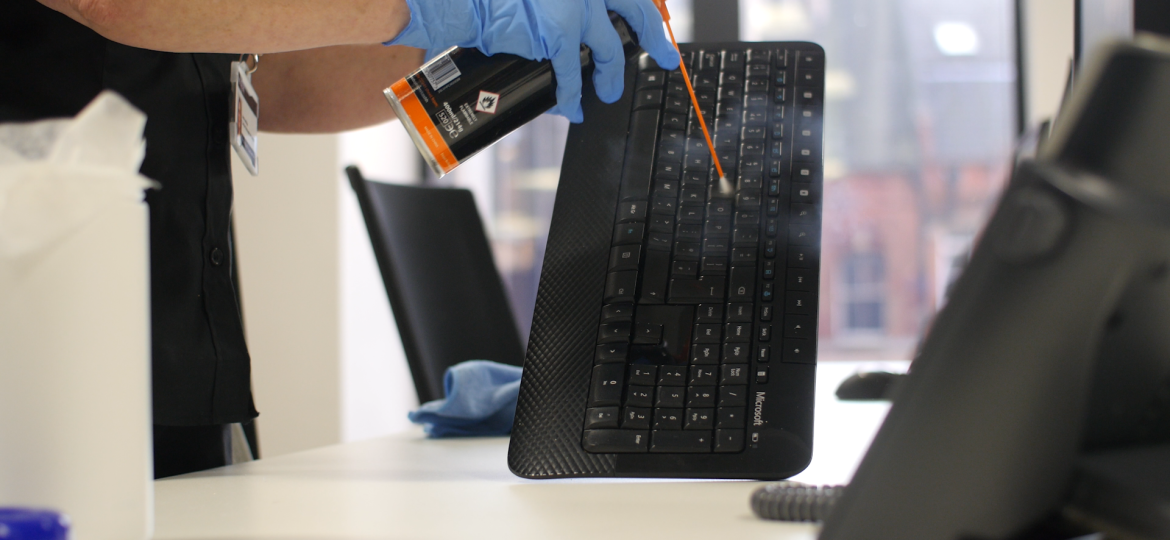
From the laptops on our desks to the shared printers in the corridor, we rely on these tools to get the job done. However, while we often remember to clean the floors and empty the bins, the hardware we touch most frequently is often neglected. Over time, devices become magnets for dust, skin cells, oils, and bacteria. Keeping IT equipment clean is about more than just making things look tidy; it’s about hygiene, staff well-being, and protecting your expensive hardware assets.

The Hidden Build-Up On High-Touch Devices
We often don’t realise how quickly grime accumulates on our tech. Keyboards, mice, and desk phones are high-touch items, meaning they’re handled hundreds of times a day. Research has suggested that an average office keyboard can harbour significantly more bacteria than a toilet seat if not regularly sanitised.
What’s more, when dust and crumbs settle under keys or inside computer vents, they act as an insulator, causing components to overheat. Professional office IT cleaning removes these hidden threats. By clearing the fans and cooling vents of servers and desktop units, you ensure that air flows freely, which can significantly extend the lifespan of your electronics and prevent sudden hardware crashes.
Factors That Determine Cleaning Frequency
There’s no one-size-fits-all answer to how often your tech needs attention. The frequency of professional IT cleaning depends entirely on the specific environment of your workplace. A small office with assigned seating will have different needs compared to a large, busy call centre.
- Hot-Desking Environments: If your office uses a hot-desking policy, multiple people handle the same keyboards and mice throughout the week. In these cases, high-touch surfaces should ideally be sanitised daily by users, with a deep professional clean occurring monthly.
- Office Size and Footfall: Larger offices with more people naturally generate more dust and airborne particles. If you have a high volume of visitors or a large workforce, your equipment will require more frequent attention to maintain hygiene standards.
- The Working Environment: Offices located near construction sites, busy roads, or those with windows that stay open will see a faster build-up of grit and soot. Similarly, if your team often eats at their desks, the risk of crumbs and sticky residue increases.
- Shared Devices: Items like communal printers, touchscreen check-in kiosks, and meeting room tablets are handled by everyone. These should be a priority for frequent, scheduled cleaning.
Why Professional IT Cleaning Is Essential For Safety
It’s tempting to hand a staff member a pack of household wet wipes and ask them to give their monitor a quick once-over. However, sensitive electronics require specific care. Using general cleaning products or too much moisture can be disastrous for high-end hardware. Standard glass cleaners often contain ammonia or alcohol that can strip the protective anti-glare coatings off modern computer screens.
By investing in professional IT cleaning, you’re ensuring that the right tools are used for the job. This typically includes anti-static brushes, compressed air for hard-to-reach crevices, and specialist microfibre cloths paired with non-abrasive, electronics-safe sanitisers. This method removes the grime without risking a short circuit or chemical damage to the plastic casings.
Protecting Your Long-Term Investment
Computers and peripherals are a major capital expenditure for any business. When dust settles on internal circuit boards, it can cause bridging, where the dust becomes slightly conductive and leads to minor shorts that slow down the machine or lead to a total failure.
Regular maintenance helps you avoid the cost of premature replacements. A clean computer runs quieter and faster because the cooling system doesn’t have to work twice as hard to push air through a wall of lint. For businesses managing hundreds of workstations, the cumulative gain in equipment longevity can result in significant savings on the annual IT budget.
Creating A Healthier Workplace Culture
Since the pandemic, office workers are much more aware of workplace hygiene. Providing a clean environment is a key part of looking after your team’s health and morale. When staff see that the company is investing in office IT cleaning, it builds confidence that their well-being is taken seriously.
Reducing the spread of common colds and seasonal flu starts with the surfaces people touch most. By scheduling professional cleans, you’re proactively reducing the number of sick days taken by employees, which keeps your business running smoothly.
How To Plan Your Cleaning Schedule
For most standard office environments, we recommend deep professional IT cleaning at least once every quarter. This allows for a thorough removal of deep-set grime that daily wipes miss. However, for high-traffic areas or shared communal tech, a monthly or even bi-weekly schedule might be more appropriate.
Contact us today to book a site survey and protect your office technology.

- What Is Industrial Deep Cleaning And Why Does It Matter? - October 22, 2026
- Why IT Equipment Cleaning Is Now A Business-Critical Service - October 8, 2026
- How Often Should You Get Your Office IT Equipment Professionally Cleaned? - September 24, 2026